Blind Line & College Ave
Orangeville, Ontario

Turn the RF module from a dead Xbox 360 into a native USB wireless receiver for your PC — no Microsoft dongle needed.
Use the Xbox 360 RF module to connect wireless controllers to your PC. The RF board from a dead 360 becomes a native wireless receiver — no Microsoft dongle needed.
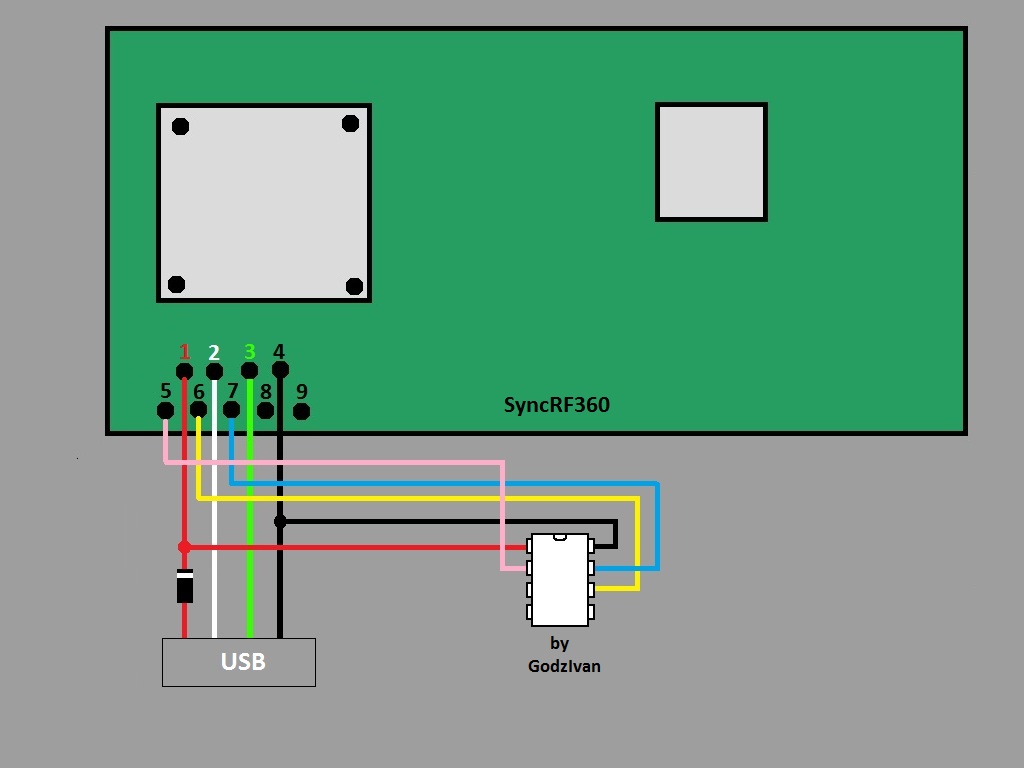
If Windows doesn't detect controllers after pairing, install the official "Xbox 360 Wireless Receiver for Windows" driver from Device Manager (pick it manually under Microsoft → Xbox 360 peripherals). One RF module supports up to 4 controllers plus chatpads and headsets.
Install images + HEX file: SyncRF360.rar (MediaFire)
Wire-only R-JTAG install diagrams for phat Xbox 360 consoles — for installs without QSBs, including the diodes you'll need.
RGH2+ install on Slim Corona v1–v2 consoles with the CR4 XL — wiring, flashing and setup, with latest-dashboard support.
RGH2+ install on Slim Corona v3–v6 (Winbond RAM) consoles with the CR4 XL — wiring, flashing and setup, with latest-dashboard support.
R-JTAG+ install on phat Zephyr, Opus, Falcon and Jasper consoles with the CR4 XL — wiring, flashing and setup, with latest-dashboard support.

Sign up and get notification about new services, promotions and sales.
