Blind Line & College Ave
Orangeville, Ontario

The most common OBDeleven / VCDS coding tweaks. Also suitable for a wide variety of other Volkswagen, Skoda and Audi models.
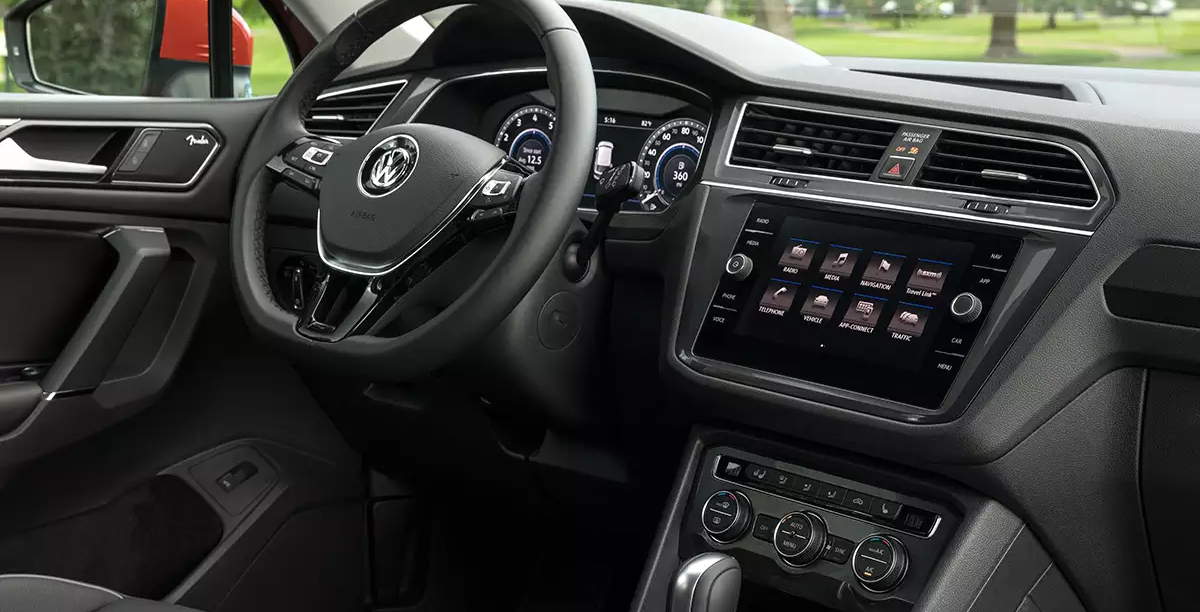
This page lists the most common OBDeleven / VCDS coding tweaks for MK2 (2016+) Volkswagen vehicles — activate features that weren't enabled from the factory. Most of these tweaks also suit a wide variety of other Volkswagen, Skoda and Audi models.
Before changing anything, make a full backup in OBDeleven / VCDS. A backup reads all adaptation channels and coding and stores them in a backup file (found in the History screen). You perform these changes at your own risk — if you aren't sure, don't do it!
Not all coding listed below will work — it depends on the equipment level and specification of your vehicle. For example, Easy Entry needs memory seats, and Adaptive Lane Tracking needs the front-facing camera.
Clear any active fault codes with OBDeleven before starting, and clear them again when you're done — some modules throw a temporary fault while being recoded. Do your coding with the ignition on and the engine off, ideally on a battery maintainer for longer sessions.
Click a tweak to expand its coding steps. Use the search box above to filter by keyword (e.g. mirror, lights, easy entry).
Allows the puddle light to operate, even when the mirrors are closed
This enables the ‘Traffic’ button to work on the headunit, and will use radio frequency data to display nearby traffic information. Once activated, in may take over an hour for the initial messages to appear.
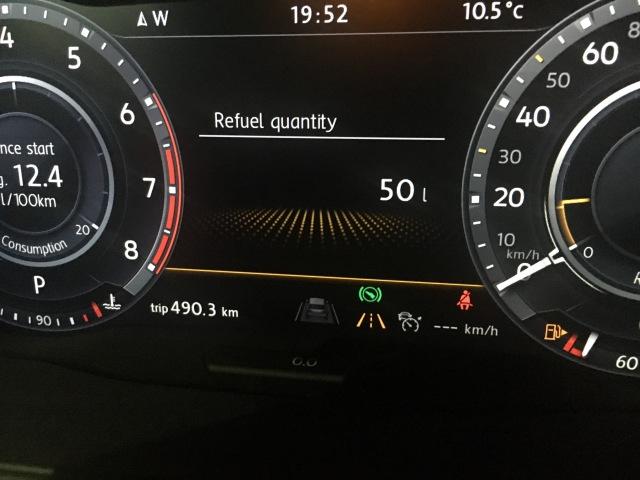
After refuelling, the amount in litres will be displayed in the cluster.
Select Control unit 17 (Dashboard)
Control unit long coding
Byte 10
Bit 4 Activate
Heated seats will resume last setting upon re-entering the vehicle.
Air Recirculate will resume last setting upon re-entering the vehicle
In wheel slip scenarios, where wheel hop is typically induced, this tweak will stop the intervention of the braking system, allowing you to continue spinning the wheels. Assist with launching the vehicle, and stops the car from ‘bogging down’.
Reports indicate that changing this setting to ‘Increased Traction’ improves the handling and makes the car feel like a permanent AWD system.
Select AWD Control Unit
Adaptation
Acoustic Measure, Wiring Logic
Choose from ‘Standard, Increased Traction, Less Noise’
Enables the Auto High Beam for Highline Models Only.
Select Control unit 09 (Central Electrics)
Security access
Access Code 31347
Adaptation
1. Fernlicht_assistent – Menuesteuerung Fernlichtassistent – Change to ‘Present’
2. Fernlicht_assistent – Erweiterte_Frenlichtsteuerung – Change to ‘AFS, FLA, Fernlicht ueber AFS’
Enter Coding
Byte 2 – Tick Bit 0 and Bit 1
Select Control Unit Front Sensor Driver Assist System (A5)
Enter Coding
Byte 21 – Tick Bit 5
Reboot Headunit. Option will now appear under ‘Light Settings’ and pushing the high beam stalk forward will reveal the symbol with an ‘A’ within it.
This tweak will enable ALG, which holds the vehicle in the centre of the lane. Can also be used to adjust sensitivity
Select Module A5
Coding
Security Key: 20103
Change ‘Point of Intervention’ to desired value e.g ‘Early’
This will now appear as a menu option under ‘Driver Assistance’
This tweak disabled the safety warning which appears each time you turn the car on
Select 5F
Coding
Byte 23
Initial Disclaimer – Off
Legal Disclaimer – Off
Displays the engine oil temperature in the cluster.
Select Control unit 17
Control unit long coding
Byte 10
Bit 01 Activate
Disable Engine Start / Stop functionality when sitting idle.
This tricks the car into needing a higher voltage then possible to turn it on.
Select Control unit 19
Adaptation
Start Stop Limit voltage
Value=12 (Default is 7.6)
XDS is an electronic differential lock, and lets you grip the road when cornering fast. It improves responses to ensure an even safer drive. In moments of fast cornering XDS lightly brakes the inside wheel to prevent wheel spinning. The result is better traction and a reduction of any tendency to under steer. This tweak will vary the aggressiveness of XDS.
Select Control unit 03 (ABS)
Adaptation
Select: Expanded Electronic Differential Lock
Options: Weak – Normal – Hard
This function increases safety in heavy rain, by applying the brake pads to the brake discs at prescribed intervals, in order to wipe away the unwanted film of water. Most drivers won’t even feel the system operating.
Select Control unit 03 (ABS)
Adaptation
Select: Disc Drying
Options: Weak-Normal-Hard
Seats move back to the furthest position when you open the door after turning off the ignition, then return to the memory position when you switch the ignition back on. Driver Profile must be enabled.
Lets you keep operating the windows after the ignition is switched off and a door is opened.
Windows open when holding down the unlock button on the key fob, and close when holding the lock button.
Change how the sunroof responds (tilt or slide) when opened with the key fob.
When rain is detected on the rain sensor, the windows will automatically close.
Select Control unit 09 (Central Electrics)
Security access
Access code 31347
Adaptation
(15) Access Control 2-Regenschliessen_ein_aus (rain-closing on/off)
Value: Permanent
(16) Access Control 2-Regenschliessen_art (rain-closing type)
Value: Permanent
(28) Zugriffskontrolle 2-Menuesteuerung Regenschliessen (access control 2 - rain-closing menu control)
Value: Aktif (active)
Select Control unit 09 (Central Electrics)
Control unit Long Coding
Subsystem: Rain / Light Sensor (RLS)
Byte 0
Bit 1-Bit 2 DeActivate
Show the A/C fan speed on the display when the climate control is operating in Auto mode.
Select Control unit 08 (Air conditioning / A/C)
Control unit Long Coding
Byte 11
Bit 6 Activate
The left or right front fog light turns on when indicating, giving a cornering-light effect. Fog lights must be fitted.
Select Control unit 09 (Central Electrics)
Security access
Access Code 31347
Adaptation
(5) Leuchte12NL LB45-Lichtfunktion B12 auswählen (lamp 12, left fog light - select light function B12)
Select: Abbiegelicht links (cornering light, left)
(5) Leuchte13NL RB5-Lichtfunktion B13 auswählen (lamp 13, right fog light - select light function B13)
Select: Abbiegelicht rechts (cornering light, right)
With the cornering fog lights enabled (above), this sets the speed range in which they are allowed to operate. Fog lights must be fitted.
Select Control unit 09 (Central Electrics)
Security access
Security Code 31347
Adaptation
(3) Static cornering light lower speed threshold
New Value = 0
(4) Static cornering light upper speed threshold
New Value = 50
Adjust how long the brakes ‘hold’ the vehicle when taking off on a steep hill.
Select Control unit 03 (Brakes)
Adaptation
Select Hill-start Assistant
Adjust as you wish. (default: Normal)
After refuelling, the amount in litres will be displayed in the cluster.
Select Control unit 17 (Dashboard)
Control unit long coding
Byte 10
Bit 4 Activate
The horn will beep when locking the vehicle.
Select Control unit 09 (Central Electrics)
Security access
Access code 31347
Adaptation
(1) feedback signals-Acoustic feedback
Value=Yes
(2) Lock feedback signals-Acoustic feedback
Value=Yes
(8) feedback signals-Acoustic feedback global
Value=Aktive
(7) feedback signals-Acoustic feedback
Value=Active
(8) feedback signals-Acoustic feedback duration
Value=Short(kurz)
Disables the sounder for the parking sensors.
Select Control unit 03 (Brakes)
Adaptation
Park Assist Activation Tone
Value = OFF
Sets the speed where the parking sensors will be disabled.
Select Control unit 03 (Brakes)
Adaptation
Shutdown parking aid
Value = 20km/h
Disables the ‘Please check surroundings’ message that appears on the headunit when parking.
Select Control unit 03 (Brakes)
Security access
Access code:71679
Control unit Coding
Byte 1
Bit 5 DeActivate
Disables the audible seat belt warning.
Select Control unit 17 (Dashboard)
Adaptation
Select:Disable channel belt warning
Value:Yes
Control unit long coding
Byte 0
Bit 2-4 Deactivate
Adjust the operating time of the rear window de-fogger
Select Control unit 09 (Central Electrics)
Security access
Access Code 31347
Adaptation
(3) Window Air condition A/C condition A/C rear window heating value
Enter desired value
When tapping the indicator to turn, this tweak will change the number of times the indicator blinks.
Select Control unit 09 (Central Electrics)
Security access
Access Code 31347
Adaptation
Aussenlicht_Bling
Komfortblinken Blinkzykien
Value: 1-5 Value 3 (Standard – 3x blinking)
Vehicle camera will read traffic signs and display the posted speed in the cluster.
Vehicle camera will attempt to keep the vehicle within the current lane.
Select Control unit 17 (Dashboard)
Control unit Long Coding
Bye 4
Bit 6 Activate
Bye 11
Bit 1 Activate
Select Control unit A5 (front / advance camera)
Control unit Long Coding
Bye 0
Bit 0 Activate
Select Control unit A5 (front / advance camera)
Security access
Access Code 20103
Adaptation
Channel – Seçim HCA_On_State
Put emphasis on menu
Channel – Seçim HCA_Warning_intensity
Put emphasis on menu
Channel – Seçim BAP_Personalisierung
Put emphasis on not activated
Select the time of engagement
Set adjustment via menu – emphasis on late
Select Personalization spurt holding an assistant to a terminal 15 – channel
Set value to last setting
Select Control unit 44 (power steering)
Control unit Long Coding
Bye 0
Bit 0 Aktif
Select Control unit 5F (Informationselektronik)
Adaptation
(49) function -Vehicle list BAP LDW_HCA_0x19
Activate
(21) vehicle menu operation-menu_display_Lane_Departure_Warning
Activate
(23) vehicle menu Bedienung_menu_display_Lane_Departure_Warning_over_threshold_high – channel
Activate
Adjust the point in which the steering wheel will vibrate to indicate the vehicle is drifting out of the lane.
Steering Wheel Vibration
Select Control unit A5 (camera)
Security access
Enter unlock code 20103
Adaptation
Select channel intensity steering wheel vibration
Value adjust accordingly Default: medium options: early, middle, late
Adjusts the sensitivity in which the car will alert the driver due to lack of steering input.
Select Control unit A5 (camera)
Security access
Enter unlock code 20103
Adaptation
Select channel deactivation threshold driver activity
Value adjust accordingly Default: medium options: early, middle, late
Supposed to change throttle input, may be placebo but I feel it accelerates in a more linear fashion
Enable the Lap Timer in the cluster.
Select Control unit 17 (Dashboard)
Control unit Long Coding
Byte 1
Bit 3 Activate
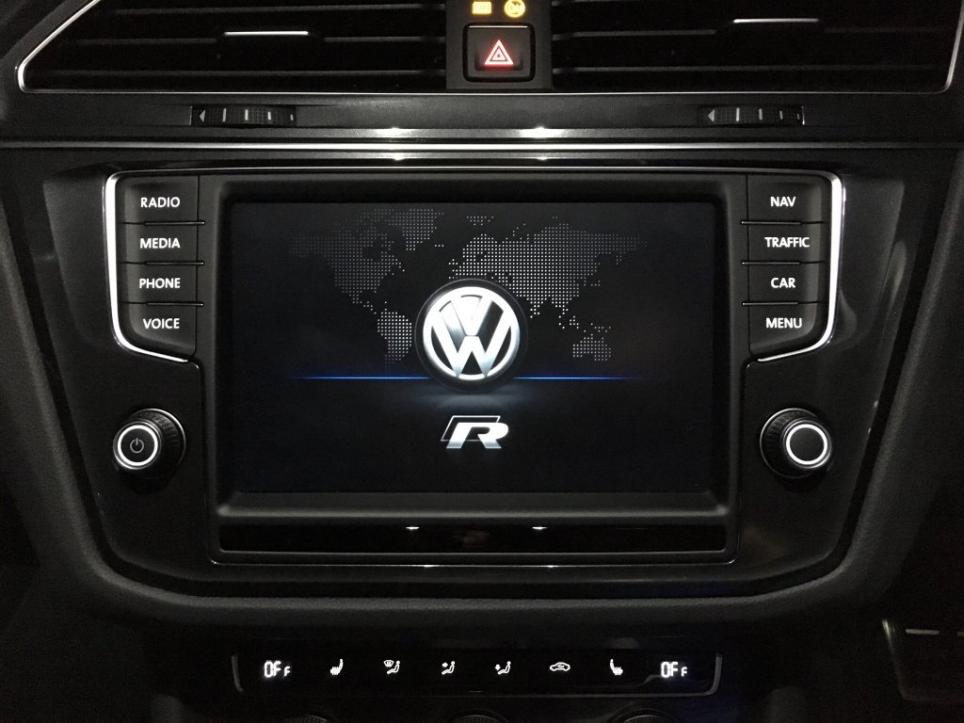
Change the boot screen picture to different models
Select Control unit 5F (infotainment)
Coding
Byte_18_Screenings
0 = None
1 = Hybrid
2 = Golf GTD
3 = Golf GTI
4 = Golf Bluemotion
5 = E-Golf
6 = R Line
7 = Golf R
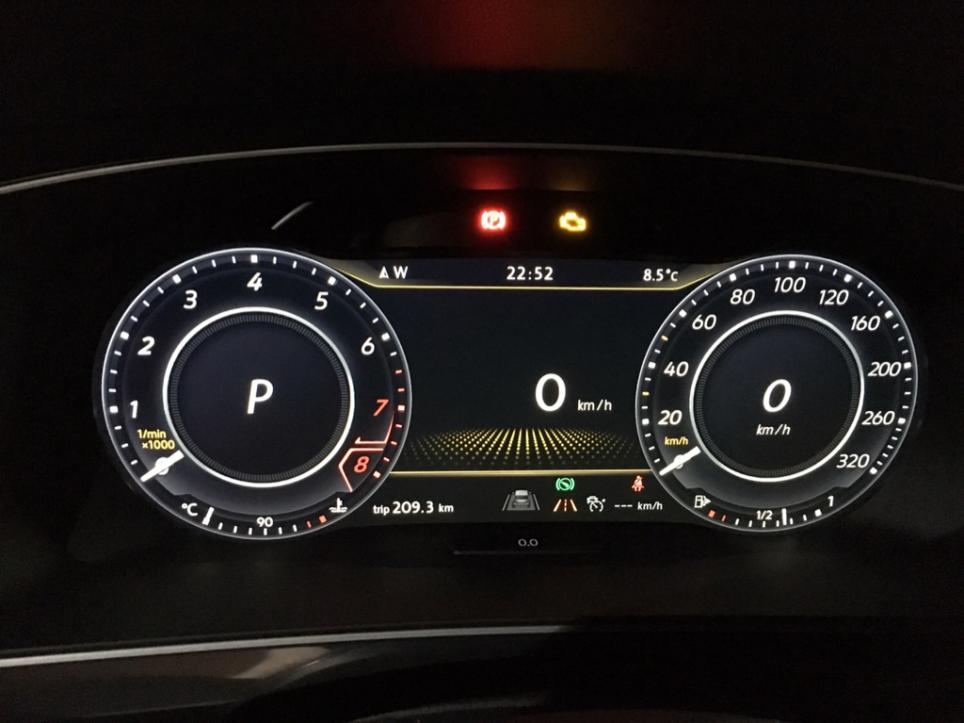
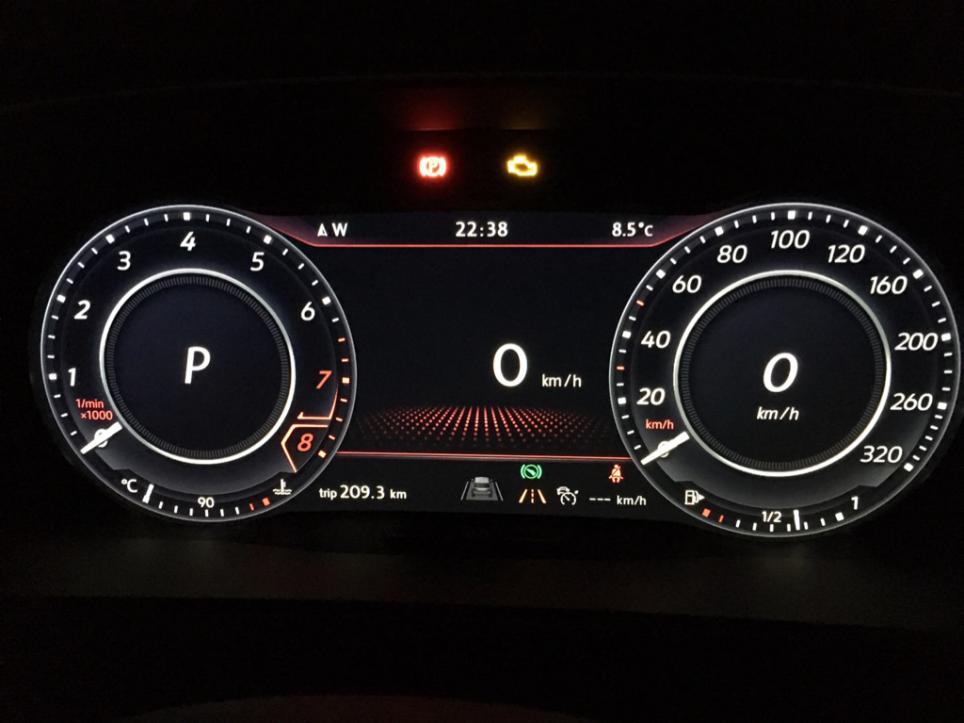
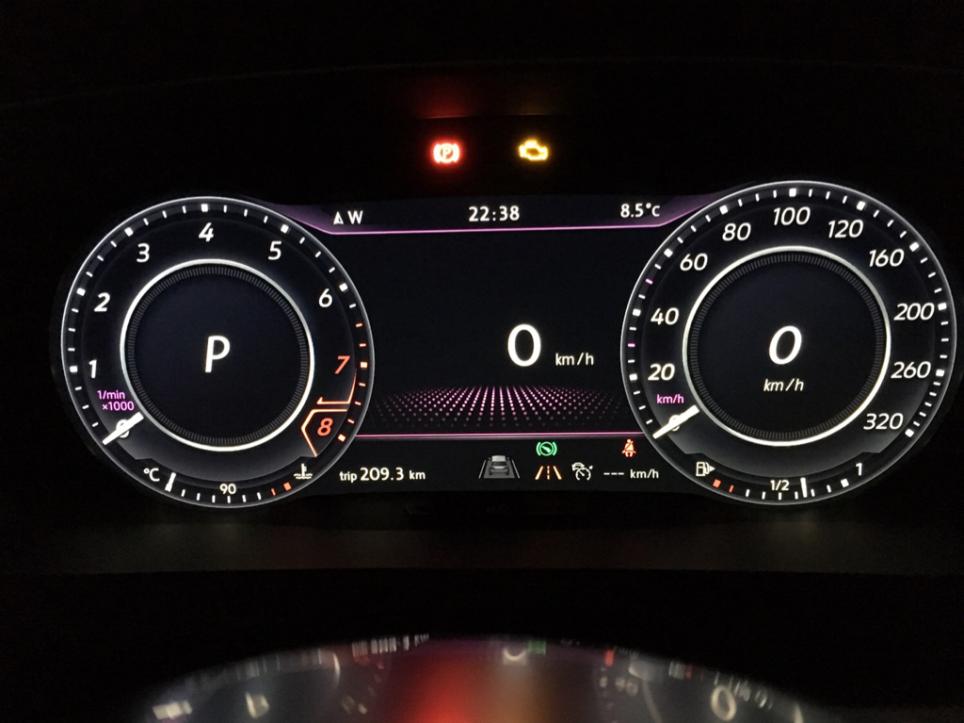
Change the gauges theme to different styes


Enable the dots visual effect on the center are of the cluster.

Change the cluster background visuals to different models
Select Dashboard (17)
Adaptation
Tube_Version
Variant_2 = Default
Variant_3 = Golf GTI
Variant_4 = Golf R
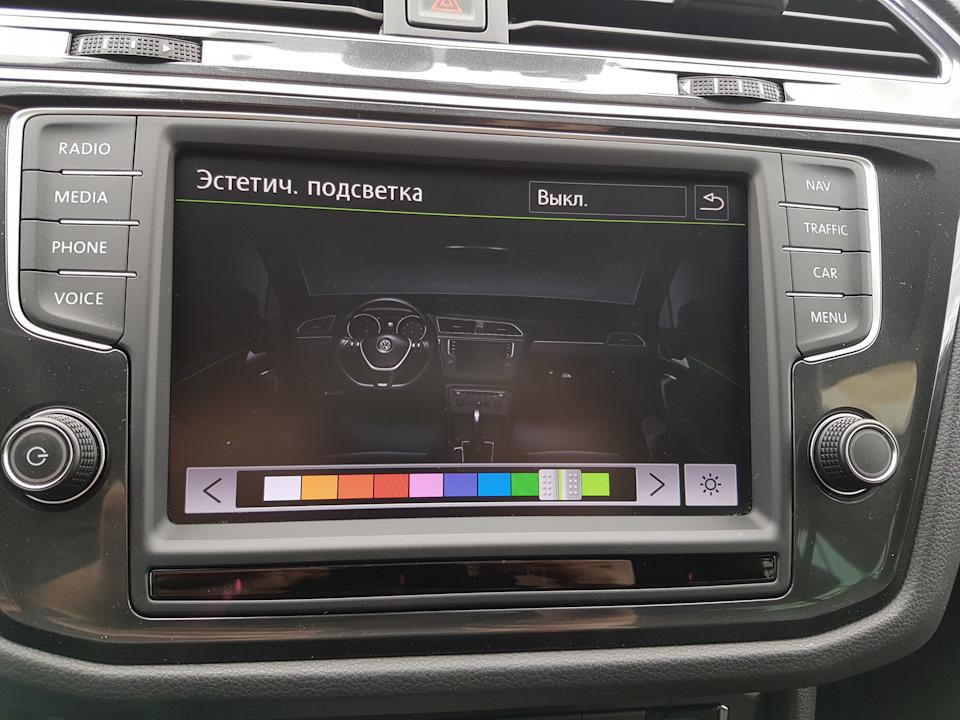
Change the ambient light color and cluster accent color from menu in head unit, can be set up with any 10 colours in the RGB spectrum.
Must have RGB LEDs installed from factory to change ambient light, some only come with White LEDs or Warm LEDs.
Color Values: (You can make your own color list, it is RGB in dec format)
[LO]_Rotwert Farbe 1:217
[LO]_Gruenwert Farbe 1:221
[LO]_Blauwert Farbe 1:235
[LO]_Rotwert Farbe 2:169
[LO]_Gruenwert Farbe 2:169
[LO]_Blauwert Farbe 2:169
[LO]_Rotwert Farbe 3:253
[LO]_Gruenwert Farbe 3:108
[LO]_Blauwert Farbe 3:55
[LO]_Rotwert Farbe 4:242
[LO]_Gruenwert Farbe 4:0
[LO]_Blauwert Farbe 4:40
[LO]_Rotwert Farbe 5:254
[LO]_Gruenwert Farbe 5:88
[LO]_Blauwert Farbe 5:240
[LO]_Rotwert Farbe 6:124
[LO]_Gruenwert Farbe 6:63
[LO]_Blauwert Farbe 6:190
[LO]_Rotwert Farbe 7:0
[LO]_Gruenwert Farbe 7:102
[LO]_Blauwert Farbe 7:255
[LO]_Rotwert Farbe 8:0
[LO]_Gruenwert Farbe 8:204
[LO]_Blauwert Farbe 8:255
[LO]_Rotwert Farbe 9:0
[LO]_Gruenwert Farbe 9:204
[LO]_Blauwert Farbe 9:0
[LO]_Rotwert Farbe 10:136
[LO]_Gruenwert Farbe 10:255
[LO]_Blauwert Farbe 10:57
Use this link to get the rgb values you desire: HTML Color Picker
When starting the vehicle, the cluster needles will ‘sweep’ their entire range.
Select Control unit 17 (Dashboard)
Control unit long coding
Byte 1
Bit 0 Activate (Ignore Bit 1, it will not work)
Adjusts the microphone gain for handsfree usage.
Select Control unit 5F (infotainment)
Adaptation
Select Mikrofonempfindlichtkeit (Microphone Sensitivity)
Adjust value as you wish.
Sunroof opens when holding down the unlock button on the key fob. Also closes when holding lock button.
Select Control unit 09 (Central Electrics)
Security access
Access Code 31347
Adaptation
(9) – Zugangskontrolle 2 – SAD Richtung Komfortöffnen auswählen
Change to Active
Enables a setting on your headunit which allows you to completely disable the Daytime Running Lights.
Select Control unit 09 (Central Electrics)
Security access
Access Code 31347
Adaptation
(2) Daytime running light activation by BAP or Operating sequence possible
Value = Aktif
Enables ‘Trailer Assist’ option under the headunit settings.
Select Park Assist Module (76)
Coding
Byte 0, Tick Bit 3
Select Instruments Module
Coding
Byte 12, Tick Bit 5
Select Reversing Camera Module
Coding
Byte 10, Tick Bit 3
1. Control Unit 5F
2. Security Access 20103
3. Adaptations
4. Search “Locked”, change all values from Blocked to Non_Blocked
5. Long Coding
6. Go to Byte 23
7. Uncheck all items (value for Byte 23 should be 00)
Disable the Soundaktor unit, which creates a fake engine sound when driving.
Select Structure Borne Sound
Adaptations
Select 'Channel of Structure Bore Sound'
Change value from 100% to any desired value, or 0%
Enables an 'Off Road Display' on the headunit. Once enabled it appears under the 'Car' menu, tap 'Selections', tap Off-Road.
Select Control Unit 5F (Information Electrical)
Security Access 31347 or 20103
Adaptations
(81) Car_Function_Adaptations_Gen2-menu_display_compass to Active
(83) Car_Function_Adaptations_Gen2-menu_display_compass_over_threshold_high to Active
(41) Car_Function_List_BAP_Gen2-compass_0x15 to Active
Restart the MIB headunit (hold Power button >10 seconds)
Shows the driver profile name in the cluster when switching modes.
Select Control unit 19
Control unit long coding
Byte 08
Bit 4 Activate
Show the Electronic Stability Program (ESP) setting within the car menu on the headunit.
Select Control unit 03
Control unit long coding
Byte 29
New value 09
Fog lights will turn on when indicating. Fog lights must be fitted.
Select Control unit 09 (Central Electrics)
Security access
Access Code 31347
Adaptation
(2)-Static AFS Light Vorschrift
Value = FMVSS 517 108
Increase the brightness of the rear tail lights.
Select Control unit 09 (Central Electrics)
Security access
Access Code 31347
Adaptation
(6)-Leuchte28RFL LC11-dimmwert AB28
Value=100
(6)-Leuchte29RFL RA64-dimmwert AB29
Value=100
If you change the fog light globe to LED, this removes the error message typically displayed.
Select Control unit 09 (Central Electrics)
Security access
Access code 31347
Adaptation
(1) LB45-Leuchte12NL Lasttyp-12
Value = 6-LED Lichtmodule
(6) Leuchte12NL LB45-Dimmwert AB 12
Value = 127
Enable a visual graphic on the headunit when parking. Uses parking sensors to display obstacles.
Select Control unit 10 (Assistance)
Security access
Access Code 71679
Control unit Long Coding
Byte 2
Bit 0 Activate
For vehicles with LED tail lights, the inner and outer rear indicators alternate when indicating or with hazards.
Select Control unit 09 (Central Electrics)
Security access
Access Code 31347
Adaptation
(16)-Leuchte2SL VLB10-Lichtfunktion G 2 to Blinken Links Dunkelphase
(18)-Leuchte2SL VLB10-Dimmwert GH 2 to 0
(19)-Leuchte2SL VLB10-Dimming Direction GH 2 to minimize
(16)-Leuchte3SL VRB21-Lichtfunktion G 3 to Blinken Links Dunkelphase
(18)-Leuchte3SL VRB21-Dimmwert GH 3 to 0
(19)-Leuchte3SL VRB21-Dimming Direction GH 3 to minimize
For vehicles fitted with LED door lights, increases the brightness.
Select Control unit 09 (Central Electrics)
Security access
Access Code 31347
Adaptation
(6)-Leuchte16BLK SLB35BLK SL KC9-Dimmwert AB 16 to max 127
(6)-Leuchte17TFLR SRB3TFL R SR KC3-Dimmwert AB 17 to max 127
LED running lights typically dim when indicating. This removes that behaviour.
Select Control unit 09 (Central Electrics)
Security access
Access Code 31347
Adaptation
(12)-Leuchte2SL VLB10-Lichtfunction E2 to not active
(12)-Leuchte3SL VRB21-Lichtfunction E3 to not active
The passenger mirror will dip down when reverse gear is selected.
Select Control unit 52 (Tuerelektr. Beifahr.)
Control unit Long Coding
Byte 04
Bit 2 Activate
Bit 3 Activate
Select Control unit 09 (Central Electrics)
Access Code 31347
Adaptation
(15) Access Control 2-Spiegelabsenkung bei Rueckwaertsfahrt to Active
(20) Access Control 2-Menuesteuerung Spiegelabsenkung to Active
After stopping the engine, your headlights remain on for the specified duration.
Select Control unit 09 (Central Electrics)
Security access
Access Code 31347
Adaptation
(3) Comfort illumination-Menueeinstellung Cominghome
Value (default: 15 seconds, maximum: 60 seconds)
Adds fog lights to the coming home / leaving home functions.
Select Control unit 09 (Central Electrics)
Security access
Access Code 31347
Adaptation
(4) Comfort lighting Coming Home Lights
Value: Nebellicht (Low Beam)
Change the centre cluster background visuals to a carbon-fibre style.
Select Control unit 17
Adaptation
Screen view
Value = Option 2
Only the Daytime Running Lights operate when the headlight switch is in 'Auto' mode.
Select Control unit 09 (Central Electrics)
Security access
Access Code 31347
Adaptation
(9) Select daytime running lights only in switch position auto
Value = Aktif
If you install LED number plate lights you will typically get a dashboard error. This fixes it.
Select Control unit 09 (Central Electrics)
Security access
Access Code 31347
Adaptation
Leuchte25KZL HA59 - Lasttyp 25 to Allgemeine LED
Leuchte25KZL HA59 - Dimmwert AB 25 to 127 (default is 100)
Enables your boot / inner tail lights to also act as brake lights.
Select Control unit 09 (Central Electrics)
Security Access Code 31347
Adaptation
Leuchte27 NSL RC6 - Lichtfunktion C27 to Bremslicht (default not active)
Leuchte27 NSL RC6 - Dimming CD27 to 100 (default is 0)
Register a new battery yourself with OBDeleven's manual coding / adaptation. This is the free method (works on the PRO plan, no Credits needed) unlike the paid 'Battery Registration' One-Click App. It tells the car's energy-management system a new battery is fitted so charging and Start/Stop behave correctly.
Before you start, read the battery's top label and note: capacity in Ah, the 3-letter manufacturer code, and the serial number.
Newer cars (UDS / CAN-bus):
Select Gateway (19)
Adaptation
Battery adaptation
Enter battery capacity (Ah), manufacturer code, serial number, and battery technology (Standard / EFB / AGM). If the serial is unknown, just change the last digit.
Save / slide right to confirm.
Older cars (KWP2000):
Select the 'Battery Regulation' control unit
Long Adaptation
Channel 4
In the Value field enter: 3-digit capacity + space + 3-letter manufacturer code + space + 10-digit serial number
If the battery TYPE changed (e.g. Standard to AGM), also open Battery Regulation > Long Coding, set the correct type, then confirm.
Tip: do this with ignition ON / engine OFF. If you don't know the manufacturer code, enter UNK. Run a quick fault scan afterwards to clear any transient codes.
Module access codes:
Module (01): 27971
Module (03): 40168
Module (09): 31347
Module (10): 71679
Module (13): 14117
Module (17): 25327 or 20103
Module (19): 20103
Module (44): 19249
Module (5F): 20103
Module (A5): 20103
Track down what's slowing your PC — Task Manager, startup programs, disk health, malware checks and more, step by step.
Convert your disk from MBR to GPT with Microsoft's built-in mbr2gpt tool — no reinstall, no data loss — and switch to UEFI boot.
First-use setup, material tests and ramp tests to dial in your CO2 laser for clean cutting and engraving — plus essential safety tips.
Everything you need to build and configure your RetroPie emulation setup. Also suitable for Pi 1/2/4/Zero.

Sign up and get notification about new services, promotions and sales.
