Coolshrimp Modz | Install Android to HP TouchPad Tablet (Replace WEBos)

Install Android to HP TouchPad Tablet (Replace WEBos)

Give the HP TouchPad a second life: replace webOS with Android (CyanogenMod) using TP Toolbox, step by step.
HomeGuides indexOtherInstall Android to HP TouchPad Tablet (Replace WEBos)

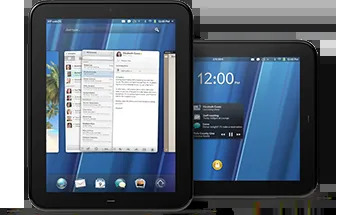
HP TouchPad tablet

Give your HP TouchPad a second life by replacing webOS with Android (CyanogenMod) using TP Toolbox.

Warning

This procedure completely wipes the tablet — webOS, Android, and all personal data are removed. Make sure the TouchPad is charged (50%+ recommended) before starting; a dead battery mid-flash can leave it hard to recover.

Installation Steps

  1. Install the Novacom drivers on your PC (included in the download at the bottom).
  2. Hold the Volume Up button while the TouchPad reboots. Once you see the large USB symbol on the screen, release the volume button.
  3. Connect the TouchPad to your PC via the USB cable.
  4. Extract the TP Toolbox files and run the launcher:
    • Windows: run tptb_v42_win.bat
    • Linux: run tptb_v42_nix.sh
    • Mac: run tptb_v42_mac.command
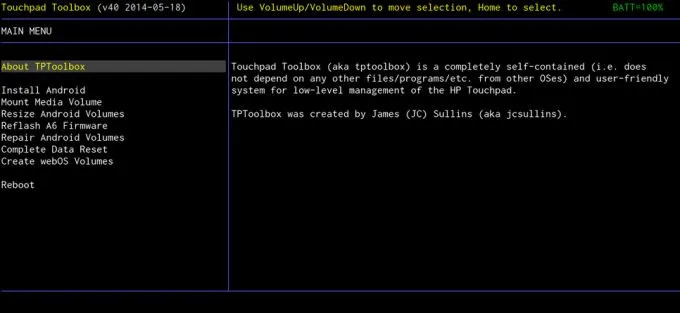
  5. A menu appears on the tablet. Use the volume buttons to navigate and the home button to select.

    TP Toolbox menu on the TouchPad

  6. Wipe the device: scroll down to Complete Data Reset, select it with the home button and choose Yes. This removes webOS and any previous Android install.
  7. Select Install Android from the menu. TP Toolbox mounts the tablet's media partition on your PC — open it under My Computer and find the ttinstall folder.
  8. Copy the ROM, GApps package and recovery zips into the ttinstall folder (the 3 zip files in the "Cyanogenmod files to ttfiles folder" folder of the download).
  9. Unmount: once all 3 zips are on the device, scroll down to Unmount Media Volume and select it.
  10. Confirm the install: it verifies the files copied correctly and asks if you want to install the OS — choose Yes.
  11. Wait. The tablet will restart a few times while everything installs.
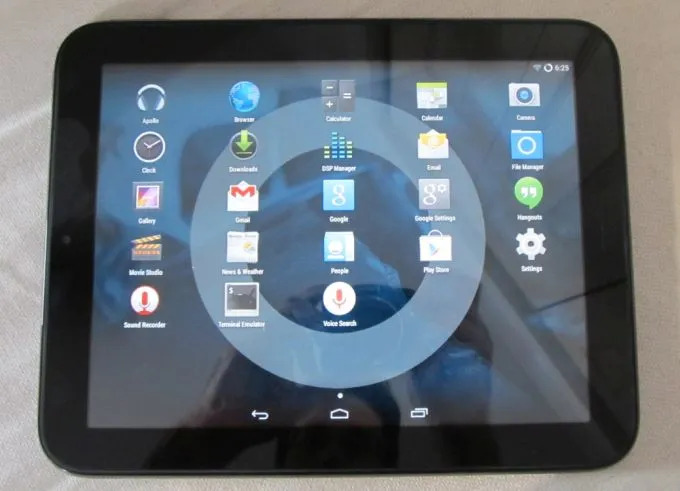
  12. Once you see the Android welcome/setup screen, you're good to go. Enjoy!

HP TouchPad running Android (CyanogenMod 11)

Tip

The TouchPad is a 2011 device — stick to lightweight apps and consider an older Google Play Services / app versions if the Play Store misbehaves. If the tablet won't power on at all, hold Power + Home for 30 seconds to force a reboot, and use a genuine HP charger — weak chargers can't keep up during flashing.

Downloads

HP TouchPad to Android (TP Toolbox, Novacom drivers, ROM + GApps + recovery): HP_TouchPad_to_Android.rar (MediaFire)

Advertisement

Similar Guides

Make a Wireless USB Device Server with a Raspberry Pi

Share USB-only printers and devices over Wi-Fi/LAN using a Raspberry Pi and the VirtualHere USB server.

2
How to Use a Sercomm iCamera2 as an IP Camera

Reuse the Xfinity/Comcast Sercomm iCamera2 as a standalone IP camera — power, setup, configuration and troubleshooting.

1
LG TV Hidden Service Menu

Open LG's hidden service menu with a DIY IR transmitter and unlock features normally reserved for higher-end models.

1
Cable Levels (Adjust Internet Quality)

Fix slow or dropping cable internet by checking your modem's signal levels — what the numbers should be and how splitters affect them.

1